atil - Alt Text Image Library
By R.W. Singh (rsingh13 at JCCC dot edu) / Source Code
Category links...
- category2
- computers
- course-thumbnails
- cs200-oop
- cs250-efficiency
- cs_rsingh13
- datastructures
- ds240
- people
- reference-canvas
- reference-course
- reference-gitlab
- reference-vscode
- reference-windows
- reference-zoom
- setup
Debug output...
Gallery
Click-and-drag or copy/paste an image to your Canvas document, alt text will be preserved, image URL will point to this website.
category2
 category2/about-course.png
Alt Text
A drawing of a cat standing at a laptop, a word balloon shows the cat saying, ''I am learning to code!'';
HTML
<img src="https://rwsingh.likespizza.com/teacher-tools/atil/uploads/category2/about-course.png" alt="A drawing of a cat standing at a laptop, a word balloon shows the cat saying, ''I am learning to code!''; ">
emacs orgmode
#+CAPTION: A drawing of a cat standing at a laptop, a word balloon shows the cat saying, ''I am learning to code!'';
#+ATTR_HTML: :alt A drawing of a cat standing at a laptop, a word balloon shows the cat saying, ''I am learning to code!'';
[[https://rwsingh.likespizza.com/teacher-tools/atil/uploads/category2/about-course.png]]
Markdown

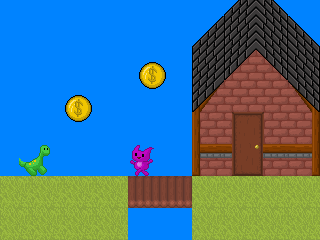 category2/image2.png
Alt Text
Pixel art of a side-view of a grassy scene with a brick house, a dinosaur and a cat, and some coins floating in the sky.
HTML
<img src="https://rwsingh.likespizza.com/teacher-tools/atil/uploads/category2/image2.png" alt="Pixel art of a side-view of a grassy scene with a brick house, a dinosaur and a cat, and some coins floating in the sky.">
emacs orgmode
#+CAPTION: Pixel art of a side-view of a grassy scene with a brick house, a dinosaur and a cat, and some coins floating in the sky.
#+ATTR_HTML: :alt Pixel art of a side-view of a grassy scene with a brick house, a dinosaur and a cat, and some coins floating in the sky.
[[https://rwsingh.likespizza.com/teacher-tools/atil/uploads/category2/image2.png]]
Markdown

computers
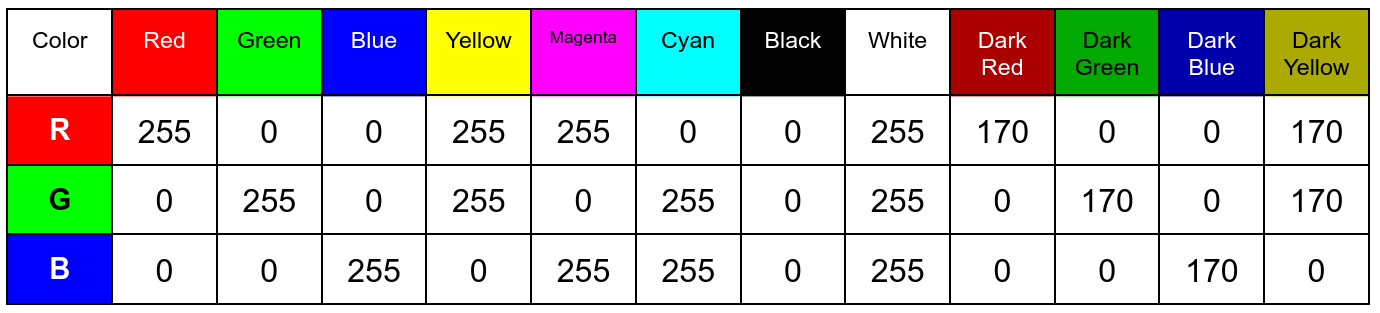 computers/ColorCodes.png
Alt Text
A table of colors showing Red, Green, and Blue values. Red, for instance, is 255 red, 0 green, 0 blue. Dark red is 170 red, 0 green, 0 blue.
HTML
<img src="https://rwsingh.likespizza.com/teacher-tools/atil/uploads/computers/ColorCodes.png" alt="A table of colors showing Red, Green, and Blue values. Red, for instance, is 255 red, 0 green, 0 blue. Dark red is 170 red, 0 green, 0 blue.">
emacs orgmode
#+CAPTION: A table of colors showing Red, Green, and Blue values. Red, for instance, is 255 red, 0 green, 0 blue. Dark red is 170 red, 0 green, 0 blue.
#+ATTR_HTML: :alt A table of colors showing Red, Green, and Blue values. Red, for instance, is 255 red, 0 green, 0 blue. Dark red is 170 red, 0 green, 0 blue.
[[https://rwsingh.likespizza.com/teacher-tools/atil/uploads/computers/ColorCodes.png]]
Markdown

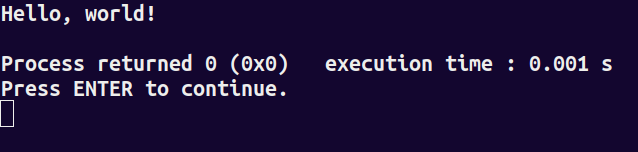 computers/image1.png
Alt Text
Screenshot of a C++ program running in the terminal. It shows the message 'Hello world!' and a return code of 0 (no errors).
HTML
<img src="https://rwsingh.likespizza.com/teacher-tools/atil/uploads/computers/image1.png" alt="Screenshot of a C++ program running in the terminal. It shows the message 'Hello world!' and a return code of 0 (no errors).">
emacs orgmode
#+CAPTION: Screenshot of a C++ program running in the terminal. It shows the message 'Hello world!' and a return code of 0 (no errors).
#+ATTR_HTML: :alt Screenshot of a C++ program running in the terminal. It shows the message 'Hello world!' and a return code of 0 (no errors).
[[https://rwsingh.likespizza.com/teacher-tools/atil/uploads/computers/image1.png]]
Markdown

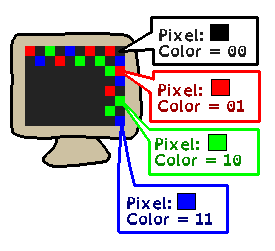 computers/image2.png
Alt Text
A drawing of a monitor that can show colorful pixels. Color 00 is black, color 01 is red, color 10 is green, and color 11 is blue.
HTML
<img src="https://rwsingh.likespizza.com/teacher-tools/atil/uploads/computers/image2.png" alt="A drawing of a monitor that can show colorful pixels. Color 00 is black, color 01 is red, color 10 is green, and color 11 is blue.">
emacs orgmode
#+CAPTION: A drawing of a monitor that can show colorful pixels. Color 00 is black, color 01 is red, color 10 is green, and color 11 is blue.
#+ATTR_HTML: :alt A drawing of a monitor that can show colorful pixels. Color 00 is black, color 01 is red, color 10 is green, and color 11 is blue.
[[https://rwsingh.likespizza.com/teacher-tools/atil/uploads/computers/image2.png]]
Markdown

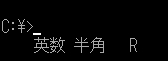 computers/image4.jpg
Alt Text
A screenshot of a Japanese computer terminal showing C:¥ instead of using a slash.
HTML
<img src="https://rwsingh.likespizza.com/teacher-tools/atil/uploads/computers/image4.jpg" alt="A screenshot of a Japanese computer terminal showing C:¥ instead of using a slash.">
emacs orgmode
#+CAPTION: A screenshot of a Japanese computer terminal showing C:¥ instead of using a slash.
#+ATTR_HTML: :alt A screenshot of a Japanese computer terminal showing C:¥ instead of using a slash.
[[https://rwsingh.likespizza.com/teacher-tools/atil/uploads/computers/image4.jpg]]
Markdown

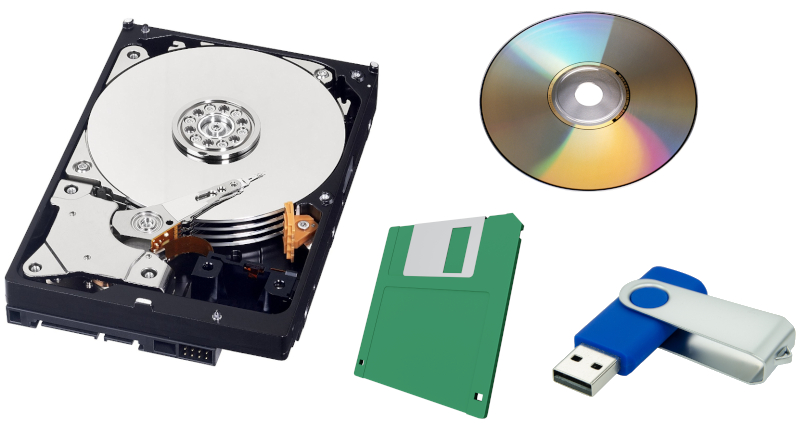 computers/image5.jpg
Alt Text
An image of a hard drive, a floppy disk, a USB stick, and a CD.
HTML
<img src="https://rwsingh.likespizza.com/teacher-tools/atil/uploads/computers/image5.jpg" alt="An image of a hard drive, a floppy disk, a USB stick, and a CD.">
emacs orgmode
#+CAPTION: An image of a hard drive, a floppy disk, a USB stick, and a CD.
#+ATTR_HTML: :alt An image of a hard drive, a floppy disk, a USB stick, and a CD.
[[https://rwsingh.likespizza.com/teacher-tools/atil/uploads/computers/image5.jpg]]
Markdown

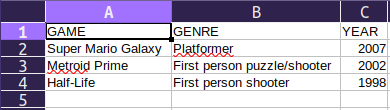 computers/image6.png
Alt Text
Screenshot of a spreadsheet with column headers Game, Genre, and Year, and a set of 3 rows beneath that of some different games.
HTML
<img src="https://rwsingh.likespizza.com/teacher-tools/atil/uploads/computers/image6.png" alt="Screenshot of a spreadsheet with column headers Game, Genre, and Year, and a set of 3 rows beneath that of some different games.">
emacs orgmode
#+CAPTION: Screenshot of a spreadsheet with column headers Game, Genre, and Year, and a set of 3 rows beneath that of some different games.
#+ATTR_HTML: :alt Screenshot of a spreadsheet with column headers Game, Genre, and Year, and a set of 3 rows beneath that of some different games.
[[https://rwsingh.likespizza.com/teacher-tools/atil/uploads/computers/image6.png]]
Markdown

 computers/image7.png
Alt Text
An image of 12 pixels: red, green, blue, yellow, magenta, cyan, black, white, then a darker red, darker green, darker blue, darker yellow.
HTML
<img src="https://rwsingh.likespizza.com/teacher-tools/atil/uploads/computers/image7.png" alt="An image of 12 pixels: red, green, blue, yellow, magenta, cyan, black, white, then a darker red, darker green, darker blue, darker yellow.">
emacs orgmode
#+CAPTION: An image of 12 pixels: red, green, blue, yellow, magenta, cyan, black, white, then a darker red, darker green, darker blue, darker yellow.
#+ATTR_HTML: :alt An image of 12 pixels: red, green, blue, yellow, magenta, cyan, black, white, then a darker red, darker green, darker blue, darker yellow.
[[https://rwsingh.likespizza.com/teacher-tools/atil/uploads/computers/image7.png]]
Markdown

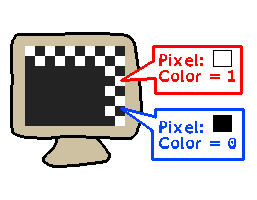 computers/image8.png
Alt Text
A drawing of a computer monitor that only displays black and white pixels. Color 1 is white, Color 0 is black.
HTML
<img src="https://rwsingh.likespizza.com/teacher-tools/atil/uploads/computers/image8.png" alt="A drawing of a computer monitor that only displays black and white pixels. Color 1 is white, Color 0 is black.">
emacs orgmode
#+CAPTION: A drawing of a computer monitor that only displays black and white pixels. Color 1 is white, Color 0 is black.
#+ATTR_HTML: :alt A drawing of a computer monitor that only displays black and white pixels. Color 1 is white, Color 0 is black.
[[https://rwsingh.likespizza.com/teacher-tools/atil/uploads/computers/image8.png]]
Markdown

course-thumbnails
 course-thumbnails/thumbnail-cs200.jpg
Alt Text
A thumbnail for CS 200: Concepts of Programming with C++, with a drawing of a student looking happy and course topics glowing above their head.
HTML
<img src="https://rwsingh.likespizza.com/teacher-tools/atil/uploads/course-thumbnails/thumbnail-cs200.jpg" alt="A thumbnail for CS 200: Concepts of Programming with C++, with a drawing of a student looking happy and course topics glowing above their head.">
emacs orgmode
#+CAPTION: A thumbnail for CS 200: Concepts of Programming with C++, with a drawing of a student looking happy and course topics glowing above their head.
#+ATTR_HTML: :alt A thumbnail for CS 200: Concepts of Programming with C++, with a drawing of a student looking happy and course topics glowing above their head.
[[https://rwsingh.likespizza.com/teacher-tools/atil/uploads/course-thumbnails/thumbnail-cs200.jpg]]
Markdown

 course-thumbnails/thumbnail-cs235.jpg
Alt Text
A thumbnail for CS 235: Object-Oriented Programming using C++, with a drawing of a student looking happy and course topics glowing above their head.
HTML
<img src="https://rwsingh.likespizza.com/teacher-tools/atil/uploads/course-thumbnails/thumbnail-cs235.jpg" alt="A thumbnail for CS 235: Object-Oriented Programming using C++, with a drawing of a student looking happy and course topics glowing above their head.">
emacs orgmode
#+CAPTION: A thumbnail for CS 235: Object-Oriented Programming using C++, with a drawing of a student looking happy and course topics glowing above their head.
#+ATTR_HTML: :alt A thumbnail for CS 235: Object-Oriented Programming using C++, with a drawing of a student looking happy and course topics glowing above their head.
[[https://rwsingh.likespizza.com/teacher-tools/atil/uploads/course-thumbnails/thumbnail-cs235.jpg]]
Markdown

 course-thumbnails/thumbnail-cs250.jpg
Alt Text
A thumbnail for CS 250: Basic Data Structures using C++, with a drawing of a student looking happy and course topics glowing above their head.
HTML
<img src="https://rwsingh.likespizza.com/teacher-tools/atil/uploads/course-thumbnails/thumbnail-cs250.jpg" alt="A thumbnail for CS 250: Basic Data Structures using C++, with a drawing of a student looking happy and course topics glowing above their head.">
emacs orgmode
#+CAPTION: A thumbnail for CS 250: Basic Data Structures using C++, with a drawing of a student looking happy and course topics glowing above their head.
#+ATTR_HTML: :alt A thumbnail for CS 250: Basic Data Structures using C++, with a drawing of a student looking happy and course topics glowing above their head.
[[https://rwsingh.likespizza.com/teacher-tools/atil/uploads/course-thumbnails/thumbnail-cs250.jpg]]
Markdown

cs200-oop
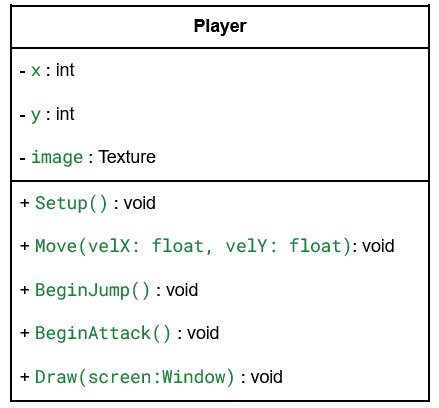 cs200-oop/UmlPlayer.png
Alt Text
A UML diagram of a Player class, which contains member variables x, y, and image, and functions like Setup, Move, BeginJump, BeginAttack, and Draw.
HTML
<img src="https://rwsingh.likespizza.com/teacher-tools/atil/uploads/cs200-oop/UmlPlayer.png" alt="A UML diagram of a Player class, which contains member variables x, y, and image, and functions like Setup, Move, BeginJump, BeginAttack, and Draw.">
emacs orgmode
#+CAPTION: A UML diagram of a Player class, which contains member variables x, y, and image, and functions like Setup, Move, BeginJump, BeginAttack, and Draw.
#+ATTR_HTML: :alt A UML diagram of a Player class, which contains member variables x, y, and image, and functions like Setup, Move, BeginJump, BeginAttack, and Draw.
[[https://rwsingh.likespizza.com/teacher-tools/atil/uploads/cs200-oop/UmlPlayer.png]]
Markdown

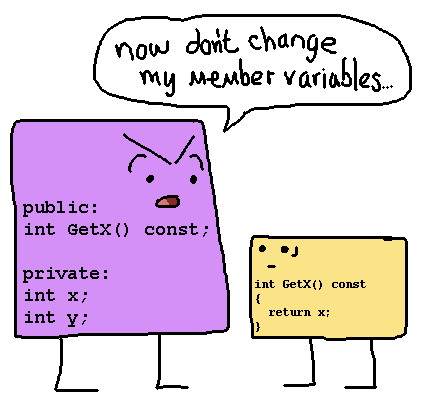 cs200-oop/constfunction.png
Alt Text
A purple class has int x and int y member variables and a GetX function marked const. It is telling the GetX function, don't change my member variables.
HTML
<img src="https://rwsingh.likespizza.com/teacher-tools/atil/uploads/cs200-oop/constfunction.png" alt="A purple class has int x and int y member variables and a GetX function marked const. It is telling the GetX function, don't change my member variables.">
emacs orgmode
#+CAPTION: A purple class has int x and int y member variables and a GetX function marked const. It is telling the GetX function, don't change my member variables.
#+ATTR_HTML: :alt A purple class has int x and int y member variables and a GetX function marked const. It is telling the GetX function, don't change my member variables.
[[https://rwsingh.likespizza.com/teacher-tools/atil/uploads/cs200-oop/constfunction.png]]
Markdown

 cs200-oop/constructors.png
Alt Text
A drawing of two critters trying to build a brick wall. One is looking at blueprints and is confused.
HTML
<img src="https://rwsingh.likespizza.com/teacher-tools/atil/uploads/cs200-oop/constructors.png" alt="A drawing of two critters trying to build a brick wall. One is looking at blueprints and is confused.">
emacs orgmode
#+CAPTION: A drawing of two critters trying to build a brick wall. One is looking at blueprints and is confused.
#+ATTR_HTML: :alt A drawing of two critters trying to build a brick wall. One is looking at blueprints and is confused.
[[https://rwsingh.likespizza.com/teacher-tools/atil/uploads/cs200-oop/constructors.png]]
Markdown

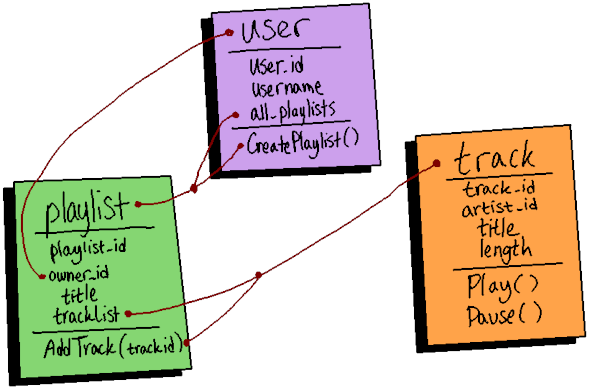 cs200-oop/image3.png
Alt Text
A diagram of three objects: User, Playlist, and Track. Relationship lines are drawn between them, like a User has a list of Playlists, a Playlist has a list of Tracks.
HTML
<img src="https://rwsingh.likespizza.com/teacher-tools/atil/uploads/cs200-oop/image3.png" alt="A diagram of three objects: User, Playlist, and Track. Relationship lines are drawn between them, like a User has a list of Playlists, a Playlist has a list of Tracks.">
emacs orgmode
#+CAPTION: A diagram of three objects: User, Playlist, and Track. Relationship lines are drawn between them, like a User has a list of Playlists, a Playlist has a list of Tracks.
#+ATTR_HTML: :alt A diagram of three objects: User, Playlist, and Track. Relationship lines are drawn between them, like a User has a list of Playlists, a Playlist has a list of Tracks.
[[https://rwsingh.likespizza.com/teacher-tools/atil/uploads/cs200-oop/image3.png]]
Markdown

 cs200-oop/image4.png
Alt Text
A drawing of a cat, with functions Meow(), Eat(), and Sleep(), and properties breed, name, and age.
HTML
<img src="https://rwsingh.likespizza.com/teacher-tools/atil/uploads/cs200-oop/image4.png" alt="A drawing of a cat, with functions Meow(), Eat(), and Sleep(), and properties breed, name, and age.">
emacs orgmode
#+CAPTION: A drawing of a cat, with functions Meow(), Eat(), and Sleep(), and properties breed, name, and age.
#+ATTR_HTML: :alt A drawing of a cat, with functions Meow(), Eat(), and Sleep(), and properties breed, name, and age.
[[https://rwsingh.likespizza.com/teacher-tools/atil/uploads/cs200-oop/image4.png]]
Markdown

 cs200-oop/thispointer.png
Alt Text
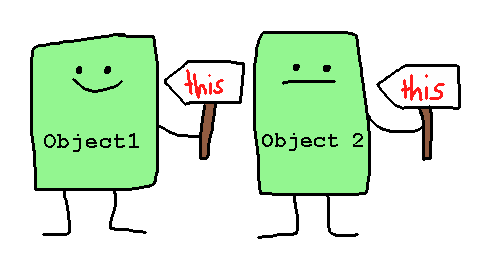
A drawing of two instance objects, Object1 and Object2, each holding their own signs that point back to them. Each sign says 'this'.
HTML
<img src="https://rwsingh.likespizza.com/teacher-tools/atil/uploads/cs200-oop/thispointer.png" alt="A drawing of two instance objects, Object1 and Object2, each holding their own signs that point back to them. Each sign says 'this'.">
emacs orgmode
#+CAPTION: A drawing of two instance objects, Object1 and Object2, each holding their own signs that point back to them. Each sign says 'this'.
#+ATTR_HTML: :alt A drawing of two instance objects, Object1 and Object2, each holding their own signs that point back to them. Each sign says 'this'.
[[https://rwsingh.likespizza.com/teacher-tools/atil/uploads/cs200-oop/thispointer.png]]
Markdown

cs250-efficiency
 cs250-efficiency/complexity.png
Alt Text
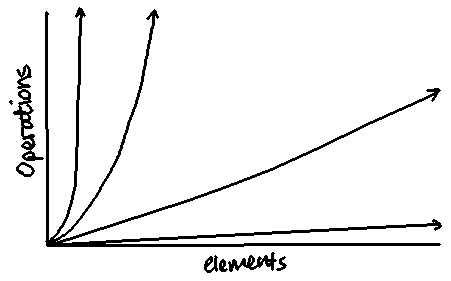
A graph with x-axis as elements, y-axxis as operations, and showing different growth rates, such as exponential, quadratic, linear, and logarithmic.
HTML
<img src="https://rwsingh.likespizza.com/teacher-tools/atil/uploads/cs250-efficiency/complexity.png" alt="A graph with x-axis as elements, y-axxis as operations, and showing different growth rates, such as exponential, quadratic, linear, and logarithmic.">
emacs orgmode
#+CAPTION: A graph with x-axis as elements, y-axxis as operations, and showing different growth rates, such as exponential, quadratic, linear, and logarithmic.
#+ATTR_HTML: :alt A graph with x-axis as elements, y-axxis as operations, and showing different growth rates, such as exponential, quadratic, linear, and logarithmic.
[[https://rwsingh.likespizza.com/teacher-tools/atil/uploads/cs250-efficiency/complexity.png]]
Markdown

cs_rsingh13
 cs_rsingh13/cynscape.png
Alt Text
A video game logo that shows C and S
HTML
<img src="https://rwsingh.likespizza.com/teacher-tools/atil/uploads/cs_rsingh13/cynscape.png" alt="A video game logo that shows C and S">
emacs orgmode
#+CAPTION: A video game logo that shows C and S
#+ATTR_HTML: :alt A video game logo that shows C and S
[[https://rwsingh.likespizza.com/teacher-tools/atil/uploads/cs_rsingh13/cynscape.png]]
Markdown

 cs_rsingh13/floppy-anime.png
Alt Text
A drawing of a cute computer diskette winking and looking happy.
HTML
<img src="https://rwsingh.likespizza.com/teacher-tools/atil/uploads/cs_rsingh13/floppy-anime.png" alt="A drawing of a cute computer diskette winking and looking happy.">
emacs orgmode
#+CAPTION: A drawing of a cute computer diskette winking and looking happy.
#+ATTR_HTML: :alt A drawing of a cute computer diskette winking and looking happy.
[[https://rwsingh.likespizza.com/teacher-tools/atil/uploads/cs_rsingh13/floppy-anime.png]]
Markdown

 cs_rsingh13/terminal-hi.png
Alt Text
A drawing of an old terminal computer with the text ''Hi!'' on the screen.
HTML
<img src="https://rwsingh.likespizza.com/teacher-tools/atil/uploads/cs_rsingh13/terminal-hi.png" alt="A drawing of an old terminal computer with the text ''Hi!'' on the screen. ">
emacs orgmode
#+CAPTION: A drawing of an old terminal computer with the text ''Hi!'' on the screen.
#+ATTR_HTML: :alt A drawing of an old terminal computer with the text ''Hi!'' on the screen.
[[https://rwsingh.likespizza.com/teacher-tools/atil/uploads/cs_rsingh13/terminal-hi.png]]
Markdown

datastructures
 datastructures/DoublyLinkedNodes.png
Alt Text
A drawing of nodes A, B, and C, each with arrows pointing to the next and previous items.
HTML
<img src="https://rwsingh.likespizza.com/teacher-tools/atil/uploads/datastructures/DoublyLinkedNodes.png" alt="A drawing of nodes A, B, and C, each with arrows pointing to the next and previous items.">
emacs orgmode
#+CAPTION: A drawing of nodes A, B, and C, each with arrows pointing to the next and previous items.
#+ATTR_HTML: :alt A drawing of nodes A, B, and C, each with arrows pointing to the next and previous items.
[[https://rwsingh.likespizza.com/teacher-tools/atil/uploads/datastructures/DoublyLinkedNodes.png]]
Markdown

 datastructures/PointingNodes.png
Alt Text
A drawing of two nodes pointing at each other.
HTML
<img src="https://rwsingh.likespizza.com/teacher-tools/atil/uploads/datastructures/PointingNodes.png" alt="A drawing of two nodes pointing at each other.">
emacs orgmode
#+CAPTION: A drawing of two nodes pointing at each other.
#+ATTR_HTML: :alt A drawing of two nodes pointing at each other.
[[https://rwsingh.likespizza.com/teacher-tools/atil/uploads/datastructures/PointingNodes.png]]
Markdown

 datastructures/SinglyLinkedNodes.png
Alt Text
A drawing of nodes A, B, and C, each node only pointing to its next neighbor.
HTML
<img src="https://rwsingh.likespizza.com/teacher-tools/atil/uploads/datastructures/SinglyLinkedNodes.png" alt="A drawing of nodes A, B, and C, each node only pointing to its next neighbor.">
emacs orgmode
#+CAPTION: A drawing of nodes A, B, and C, each node only pointing to its next neighbor.
#+ATTR_HTML: :alt A drawing of nodes A, B, and C, each node only pointing to its next neighbor.
[[https://rwsingh.likespizza.com/teacher-tools/atil/uploads/datastructures/SinglyLinkedNodes.png]]
Markdown

ds240
![X is [(2, 3), (4, 5)]
Y is [(a, b), (c, d)]
X+Y is [(2+a, 3+b), (4+c, 5+d)]](uploads/ds240/array-add.png "X is [(2, 3), (4, 5)]
Y is [(a, b), (c, d)]
X+Y is [(2+a, 3+b), (4+c, 5+d)]") ds240/array-add.png
ds240/array-add.pngAlt Text
X is [(2, 3), (4, 5)] Y is [(a, b), (c, d)] X+Y is [(2+a, 3+b), (4+c, 5+d)]
HTML
<img src="https://rwsingh.likespizza.com/teacher-tools/atil/uploads/ds240/array-add.png" alt="X is [(2, 3), (4, 5)] Y is [(a, b), (c, d)] X+Y is [(2+a, 3+b), (4+c, 5+d)]">
emacs orgmode
#+CAPTION: X is [(2, 3), (4, 5)]
Y is [(a, b), (c, d)]
X+Y is [(2+a, 3+b), (4+c, 5+d)]
#+ATTR_HTML: :alt X is [(2, 3), (4, 5)]
Y is [(a, b), (c, d)]
X+Y is [(2+a, 3+b), (4+c, 5+d)]
[[https://rwsingh.likespizza.com/teacher-tools/atil/uploads/ds240/array-add.png]]
Markdown
![X is [(2, 3), (4, 5)] Y is [(a, b), (c, d)] X+Y is [(2+a, 3+b), (4+c, 5+d)]](https://rwsingh.likespizza.com/teacher-tools/atil/uploads/ds240/array-add.png)
![X is [(2, 3), (4, 5)]
Y is [(a, b), (c, d)]
X/Y is [(2/a, 3/b), (4/c, 5/d)]](uploads/ds240/array-div.png "X is [(2, 3), (4, 5)]
Y is [(a, b), (c, d)]
X/Y is [(2/a, 3/b), (4/c, 5/d)]") ds240/array-div.png
ds240/array-div.pngAlt Text
X is [(2, 3), (4, 5)] Y is [(a, b), (c, d)] X/Y is [(2/a, 3/b), (4/c, 5/d)]
HTML
<img src="https://rwsingh.likespizza.com/teacher-tools/atil/uploads/ds240/array-div.png" alt="X is [(2, 3), (4, 5)] Y is [(a, b), (c, d)] X/Y is [(2/a, 3/b), (4/c, 5/d)]">
emacs orgmode
#+CAPTION: X is [(2, 3), (4, 5)]
Y is [(a, b), (c, d)]
X/Y is [(2/a, 3/b), (4/c, 5/d)]
#+ATTR_HTML: :alt X is [(2, 3), (4, 5)]
Y is [(a, b), (c, d)]
X/Y is [(2/a, 3/b), (4/c, 5/d)]
[[https://rwsingh.likespizza.com/teacher-tools/atil/uploads/ds240/array-div.png]]
Markdown
![X is [(2, 3), (4, 5)] Y is [(a, b), (c, d)] X/Y is [(2/a, 3/b), (4/c, 5/d)]](https://rwsingh.likespizza.com/teacher-tools/atil/uploads/ds240/array-div.png)
![X is [(2, 3), (4, 5)]
Y is [(a, b), (c, d)]
X*Y is [(2*a, 3*b), (4*c, 5*d)]](uploads/ds240/array-mult.png "X is [(2, 3), (4, 5)]
Y is [(a, b), (c, d)]
X*Y is [(2*a, 3*b), (4*c, 5*d)]") ds240/array-mult.png
ds240/array-mult.pngAlt Text
X is [(2, 3), (4, 5)] Y is [(a, b), (c, d)] X*Y is [(2*a, 3*b), (4*c, 5*d)]
HTML
<img src="https://rwsingh.likespizza.com/teacher-tools/atil/uploads/ds240/array-mult.png" alt="X is [(2, 3), (4, 5)] Y is [(a, b), (c, d)] X*Y is [(2*a, 3*b), (4*c, 5*d)]">
emacs orgmode
#+CAPTION: X is [(2, 3), (4, 5)]
Y is [(a, b), (c, d)]
X*Y is [(2*a, 3*b), (4*c, 5*d)]
#+ATTR_HTML: :alt X is [(2, 3), (4, 5)]
Y is [(a, b), (c, d)]
X*Y is [(2*a, 3*b), (4*c, 5*d)]
[[https://rwsingh.likespizza.com/teacher-tools/atil/uploads/ds240/array-mult.png]]
Markdown
![X is [(2, 3), (4, 5)] Y is [(a, b), (c, d)] X*Y is [(2*a, 3*b), (4*c, 5*d)]](https://rwsingh.likespizza.com/teacher-tools/atil/uploads/ds240/array-mult.png)
![X is [(2, 3), (4, 5)]
Y is [(a, b), (c, d)]
X-Y is [(2-a, 3-b), (4-c, 5-d)]](uploads/ds240/array-sub.png "X is [(2, 3), (4, 5)]
Y is [(a, b), (c, d)]
X-Y is [(2-a, 3-b), (4-c, 5-d)]") ds240/array-sub.png
ds240/array-sub.pngAlt Text
X is [(2, 3), (4, 5)] Y is [(a, b), (c, d)] X-Y is [(2-a, 3-b), (4-c, 5-d)]
HTML
<img src="https://rwsingh.likespizza.com/teacher-tools/atil/uploads/ds240/array-sub.png" alt="X is [(2, 3), (4, 5)] Y is [(a, b), (c, d)] X-Y is [(2-a, 3-b), (4-c, 5-d)]">
emacs orgmode
#+CAPTION: X is [(2, 3), (4, 5)]
Y is [(a, b), (c, d)]
X-Y is [(2-a, 3-b), (4-c, 5-d)]
#+ATTR_HTML: :alt X is [(2, 3), (4, 5)]
Y is [(a, b), (c, d)]
X-Y is [(2-a, 3-b), (4-c, 5-d)]
[[https://rwsingh.likespizza.com/teacher-tools/atil/uploads/ds240/array-sub.png]]
Markdown
![X is [(2, 3), (4, 5)] Y is [(a, b), (c, d)] X-Y is [(2-a, 3-b), (4-c, 5-d)]](https://rwsingh.likespizza.com/teacher-tools/atil/uploads/ds240/array-sub.png)
people
 people/RWS.png
Alt Text
A drawing of R.W. waving and smiling.
HTML
<img src="https://rwsingh.likespizza.com/teacher-tools/atil/uploads/people/RWS.png" alt="A drawing of R.W. waving and smiling.">
emacs orgmode
#+CAPTION: A drawing of R.W. waving and smiling.
#+ATTR_HTML: :alt A drawing of R.W. waving and smiling.
[[https://rwsingh.likespizza.com/teacher-tools/atil/uploads/people/RWS.png]]
Markdown

reference-canvas
 reference-canvas/CanvasStartAssignment.png
Alt Text
Screenshot of a Canvas assignment and the 'Start Assignment' button.
HTML
<img src="https://rwsingh.likespizza.com/teacher-tools/atil/uploads/reference-canvas/CanvasStartAssignment.png" alt="Screenshot of a Canvas assignment and the 'Start Assignment' button.">
emacs orgmode
#+CAPTION: Screenshot of a Canvas assignment and the 'Start Assignment' button.
#+ATTR_HTML: :alt Screenshot of a Canvas assignment and the 'Start Assignment' button.
[[https://rwsingh.likespizza.com/teacher-tools/atil/uploads/reference-canvas/CanvasStartAssignment.png]]
Markdown

 reference-canvas/CanvasWebsiteUrlPaste.png
Alt Text
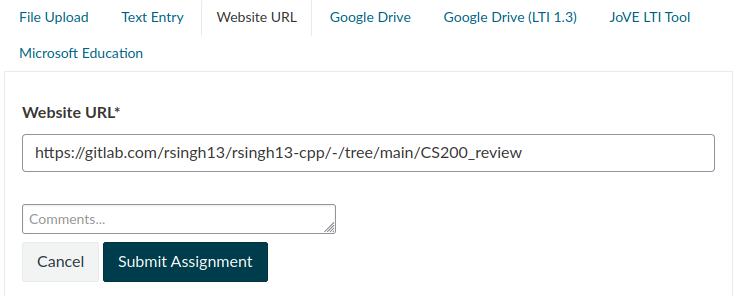
A screenshot of the 'Website URL' upload view in a Canvas assignment, with a GitLab URL pasted in.
HTML
<img src="https://rwsingh.likespizza.com/teacher-tools/atil/uploads/reference-canvas/CanvasWebsiteUrlPaste.png" alt="A screenshot of the 'Website URL' upload view in a Canvas assignment, with a GitLab URL pasted in.">
emacs orgmode
#+CAPTION: A screenshot of the 'Website URL' upload view in a Canvas assignment, with a GitLab URL pasted in.
#+ATTR_HTML: :alt A screenshot of the 'Website URL' upload view in a Canvas assignment, with a GitLab URL pasted in.
[[https://rwsingh.likespizza.com/teacher-tools/atil/uploads/reference-canvas/CanvasWebsiteUrlPaste.png]]
Markdown

reference-course
 reference-course/CourseScheduleView.png
Alt Text
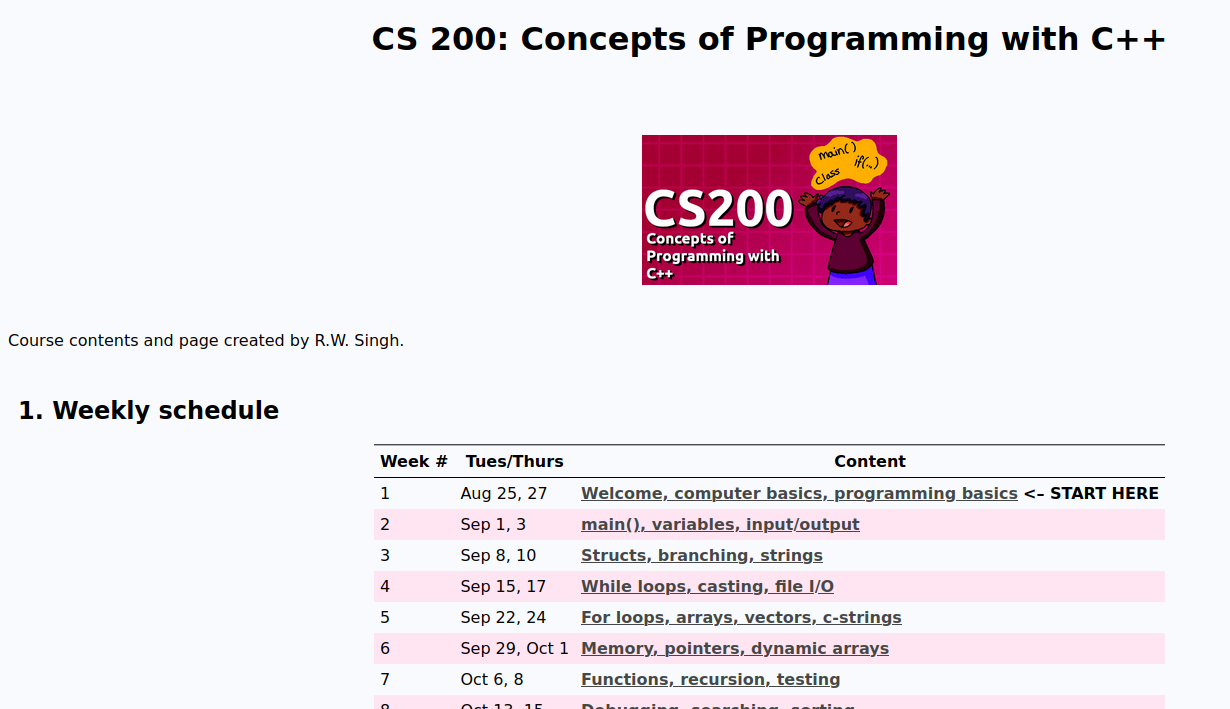
A screenshot of the homepage of a course, with a table of the weeks and topics for the semester.
HTML
<img src="https://rwsingh.likespizza.com/teacher-tools/atil/uploads/reference-course/CourseScheduleView.png" alt="A screenshot of the homepage of a course, with a table of the weeks and topics for the semester.">
emacs orgmode
#+CAPTION: A screenshot of the homepage of a course, with a table of the weeks and topics for the semester.
#+ATTR_HTML: :alt A screenshot of the homepage of a course, with a table of the weeks and topics for the semester.
[[https://rwsingh.likespizza.com/teacher-tools/atil/uploads/reference-course/CourseScheduleView.png]]
Markdown

 reference-course/CourseWeekView.png
Alt Text
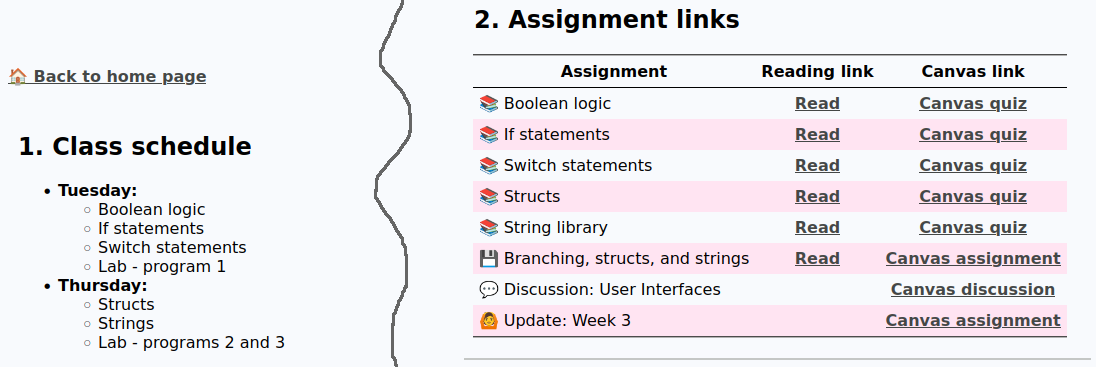
A screenshot of a class' schedule for Tuesday and Thursday in-class, and the assignment links for reading and Canvas links.
HTML
<img src="https://rwsingh.likespizza.com/teacher-tools/atil/uploads/reference-course/CourseWeekView.png" alt="A screenshot of a class' schedule for Tuesday and Thursday in-class, and the assignment links for reading and Canvas links.">
emacs orgmode
#+CAPTION: A screenshot of a class' schedule for Tuesday and Thursday in-class, and the assignment links for reading and Canvas links.
#+ATTR_HTML: :alt A screenshot of a class' schedule for Tuesday and Thursday in-class, and the assignment links for reading and Canvas links.
[[https://rwsingh.likespizza.com/teacher-tools/atil/uploads/reference-course/CourseWeekView.png]]
Markdown

reference-gitlab
 reference-gitlab/GitlabDirectoryName.png
Alt Text
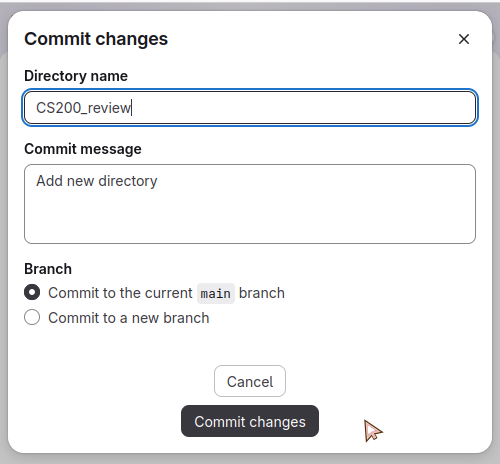
Screenshot of the directory name being set in GitLab.
HTML
<img src="https://rwsingh.likespizza.com/teacher-tools/atil/uploads/reference-gitlab/GitlabDirectoryName.png" alt="Screenshot of the directory name being set in GitLab.">
emacs orgmode
#+CAPTION: Screenshot of the directory name being set in GitLab.
#+ATTR_HTML: :alt Screenshot of the directory name being set in GitLab.
[[https://rwsingh.likespizza.com/teacher-tools/atil/uploads/reference-gitlab/GitlabDirectoryName.png]]
Markdown

 reference-gitlab/GitlabEditProfile.png
Alt Text
Screenshot of GitLab, user having clicked their profile image, and is selecting Edit profile.
HTML
<img src="https://rwsingh.likespizza.com/teacher-tools/atil/uploads/reference-gitlab/GitlabEditProfile.png" alt="Screenshot of GitLab, user having clicked their profile image, and is selecting Edit profile.">
emacs orgmode
#+CAPTION: Screenshot of GitLab, user having clicked their profile image, and is selecting Edit profile.
#+ATTR_HTML: :alt Screenshot of GitLab, user having clicked their profile image, and is selecting Edit profile.
[[https://rwsingh.likespizza.com/teacher-tools/atil/uploads/reference-gitlab/GitlabEditProfile.png]]
Markdown

 reference-gitlab/GitlabFolderSelect.png
Alt Text
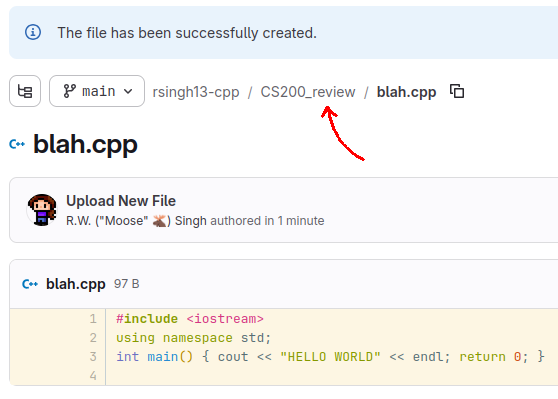
Screenshot the 'breadcrumb' links in GitLab, with an arrow pointing to the 'CS200review' folder to click on.
HTML
<img src="https://rwsingh.likespizza.com/teacher-tools/atil/uploads/reference-gitlab/GitlabFolderSelect.png" alt="Screenshot the 'breadcrumb' links in GitLab, with an arrow pointing to the 'CS200review' folder to click on.">
emacs orgmode
#+CAPTION: Screenshot the 'breadcrumb' links in GitLab, with an arrow pointing to the 'CS200review' folder to click on.
#+ATTR_HTML: :alt Screenshot the 'breadcrumb' links in GitLab, with an arrow pointing to the 'CS200review' folder to click on.
[[https://rwsingh.likespizza.com/teacher-tools/atil/uploads/reference-gitlab/GitlabFolderSelect.png]]
Markdown

 reference-gitlab/GitlabForgotPassword.png
Alt Text
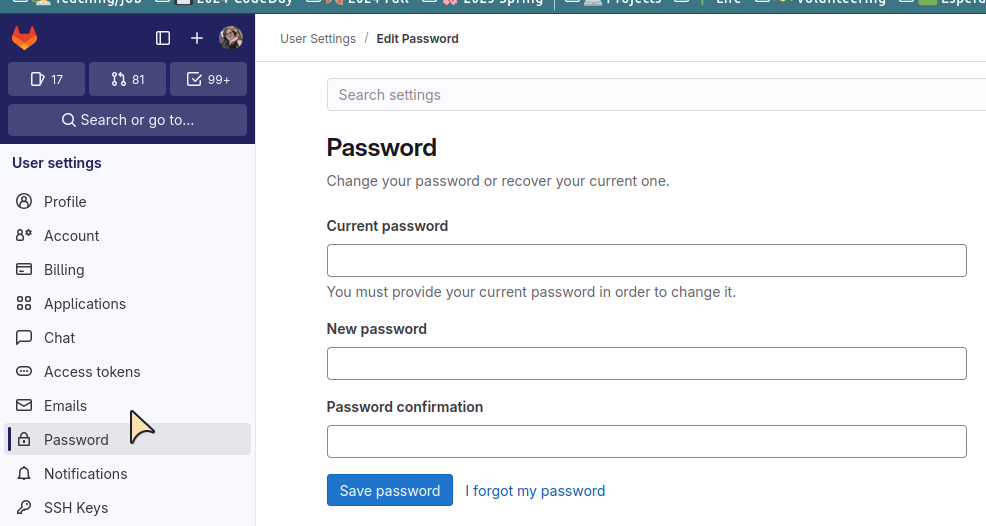
A screenshot of the Change Password screen, including the I Forgot my Password link.
HTML
<img src="https://rwsingh.likespizza.com/teacher-tools/atil/uploads/reference-gitlab/GitlabForgotPassword.png" alt="A screenshot of the Change Password screen, including the I Forgot my Password link.">
emacs orgmode
#+CAPTION: A screenshot of the Change Password screen, including the I Forgot my Password link.
#+ATTR_HTML: :alt A screenshot of the Change Password screen, including the I Forgot my Password link.
[[https://rwsingh.likespizza.com/teacher-tools/atil/uploads/reference-gitlab/GitlabForgotPassword.png]]
Markdown

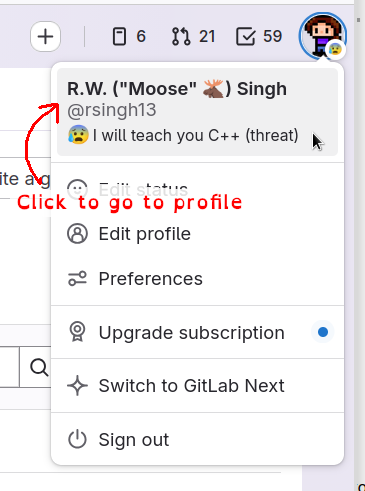 reference-gitlab/GitlabGotoProfile.png
Alt Text
Screenshot of the user clicking on their profile image, then selecting their name to go to their profile.
HTML
<img src="https://rwsingh.likespizza.com/teacher-tools/atil/uploads/reference-gitlab/GitlabGotoProfile.png" alt="Screenshot of the user clicking on their profile image, then selecting their name to go to their profile.">
emacs orgmode
#+CAPTION: Screenshot of the user clicking on their profile image, then selecting their name to go to their profile.
#+ATTR_HTML: :alt Screenshot of the user clicking on their profile image, then selecting their name to go to their profile.
[[https://rwsingh.likespizza.com/teacher-tools/atil/uploads/reference-gitlab/GitlabGotoProfile.png]]
Markdown

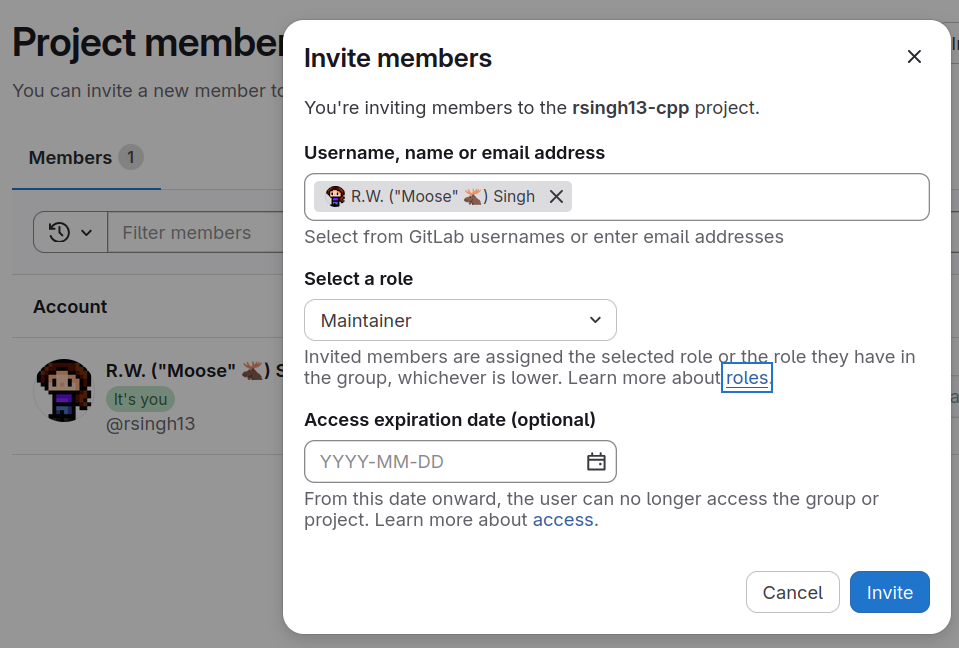 reference-gitlab/GitlabInviteMember.png
Alt Text
Screenshot of the Invite Members screen, with the instructor being added as a maintainer.
HTML
<img src="https://rwsingh.likespizza.com/teacher-tools/atil/uploads/reference-gitlab/GitlabInviteMember.png" alt="Screenshot of the Invite Members screen, with the instructor being added as a maintainer.">
emacs orgmode
#+CAPTION: Screenshot of the Invite Members screen, with the instructor being added as a maintainer.
#+ATTR_HTML: :alt Screenshot of the Invite Members screen, with the instructor being added as a maintainer.
[[https://rwsingh.likespizza.com/teacher-tools/atil/uploads/reference-gitlab/GitlabInviteMember.png]]
Markdown

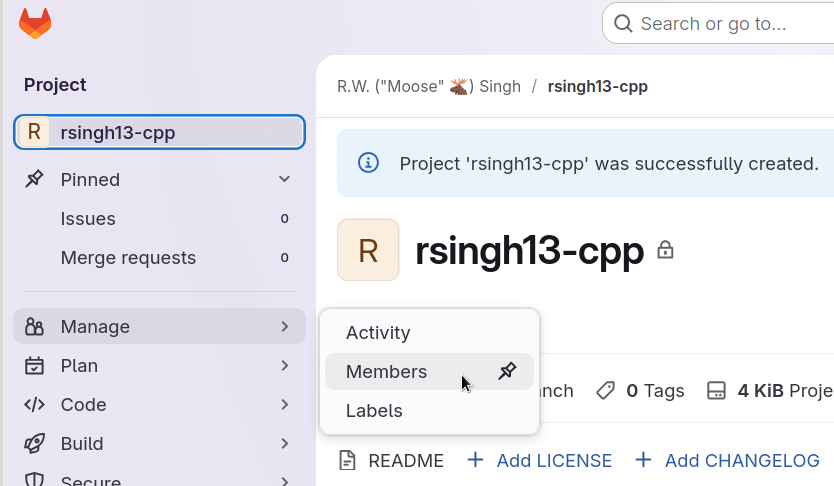 reference-gitlab/GitlabManageMembers.png
Alt Text
Screenshot of the left sidebar nav for the repository, selecting 'Manage' and then 'Members'.
HTML
<img src="https://rwsingh.likespizza.com/teacher-tools/atil/uploads/reference-gitlab/GitlabManageMembers.png" alt="Screenshot of the left sidebar nav for the repository, selecting 'Manage' and then 'Members'.">
emacs orgmode
#+CAPTION: Screenshot of the left sidebar nav for the repository, selecting 'Manage' and then 'Members'.
#+ATTR_HTML: :alt Screenshot of the left sidebar nav for the repository, selecting 'Manage' and then 'Members'.
[[https://rwsingh.likespizza.com/teacher-tools/atil/uploads/reference-gitlab/GitlabManageMembers.png]]
Markdown

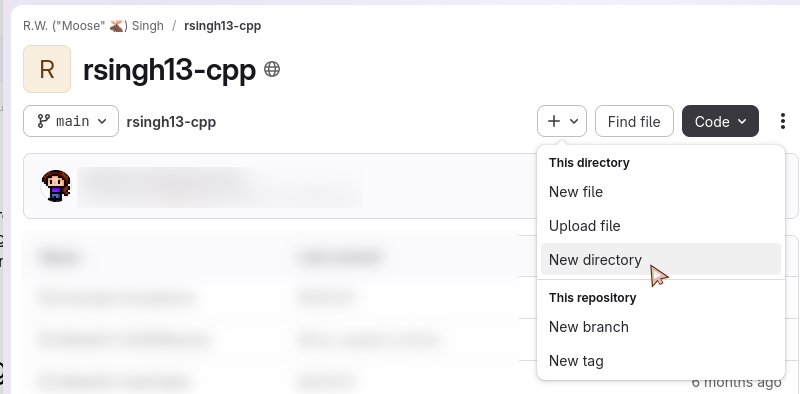 reference-gitlab/GitlabNewDirectory.png
Alt Text
Screenshot of the 'new directory' button being highlighted.
HTML
<img src="https://rwsingh.likespizza.com/teacher-tools/atil/uploads/reference-gitlab/GitlabNewDirectory.png" alt="Screenshot of the 'new directory' button being highlighted.">
emacs orgmode
#+CAPTION: Screenshot of the 'new directory' button being highlighted.
#+ATTR_HTML: :alt Screenshot of the 'new directory' button being highlighted.
[[https://rwsingh.likespizza.com/teacher-tools/atil/uploads/reference-gitlab/GitlabNewDirectory.png]]
Markdown

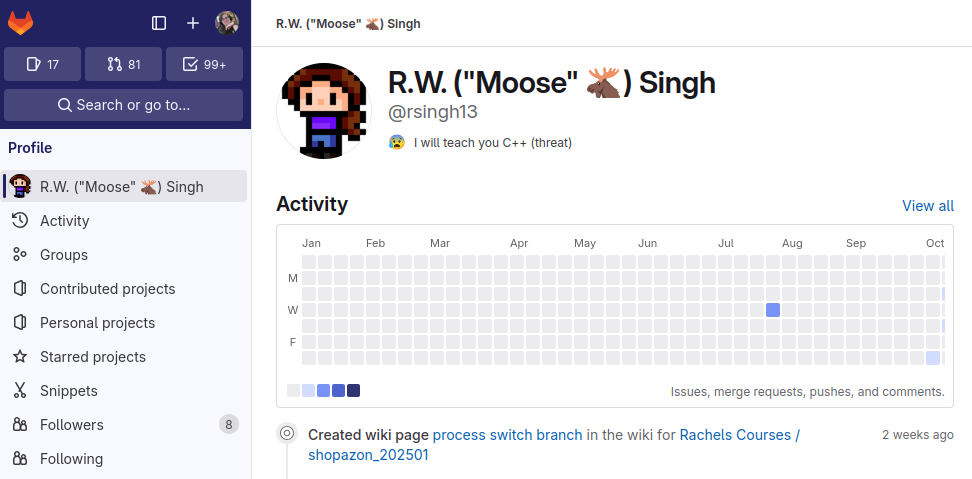 reference-gitlab/GitlabProfile.png
Alt Text
Screenshot of a profile page on GitLab.
HTML
<img src="https://rwsingh.likespizza.com/teacher-tools/atil/uploads/reference-gitlab/GitlabProfile.png" alt="Screenshot of a profile page on GitLab.">
emacs orgmode
#+CAPTION: Screenshot of a profile page on GitLab.
#+ATTR_HTML: :alt Screenshot of a profile page on GitLab.
[[https://rwsingh.likespizza.com/teacher-tools/atil/uploads/reference-gitlab/GitlabProfile.png]]
Markdown

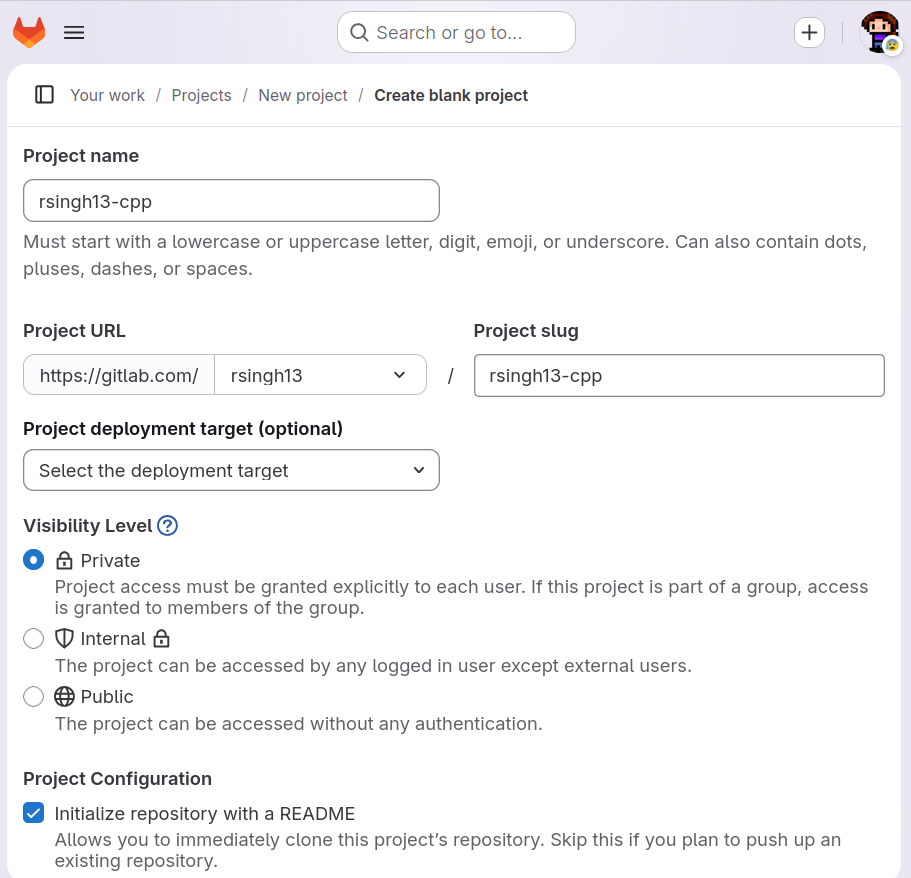 reference-gitlab/GitlabRepoCreation.png
Alt Text
Screenshot of the GitLab new repository screen.
HTML
<img src="https://rwsingh.likespizza.com/teacher-tools/atil/uploads/reference-gitlab/GitlabRepoCreation.png" alt="Screenshot of the GitLab new repository screen.">
emacs orgmode
#+CAPTION: Screenshot of the GitLab new repository screen.
#+ATTR_HTML: :alt Screenshot of the GitLab new repository screen.
[[https://rwsingh.likespizza.com/teacher-tools/atil/uploads/reference-gitlab/GitlabRepoCreation.png]]
Markdown

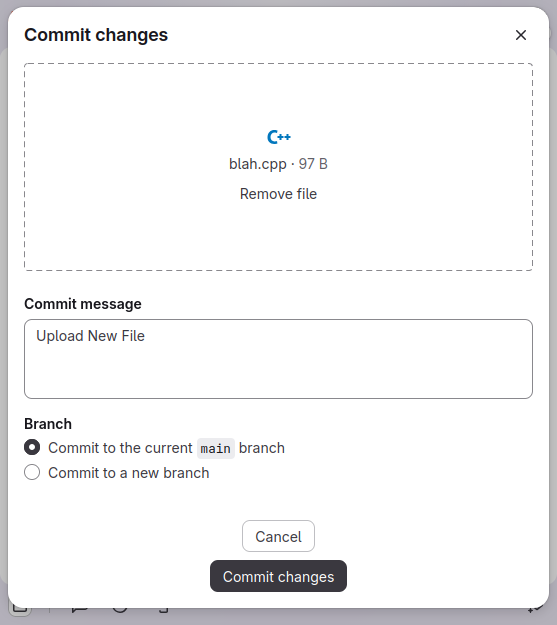 reference-gitlab/GitlabUploadFile.png
Alt Text
Screenshot of the commit changes pane in GitLab's webpage.
HTML
<img src="https://rwsingh.likespizza.com/teacher-tools/atil/uploads/reference-gitlab/GitlabUploadFile.png" alt="Screenshot of the commit changes pane in GitLab's webpage.">
emacs orgmode
#+CAPTION: Screenshot of the commit changes pane in GitLab's webpage.
#+ATTR_HTML: :alt Screenshot of the commit changes pane in GitLab's webpage.
[[https://rwsingh.likespizza.com/teacher-tools/atil/uploads/reference-gitlab/GitlabUploadFile.png]]
Markdown

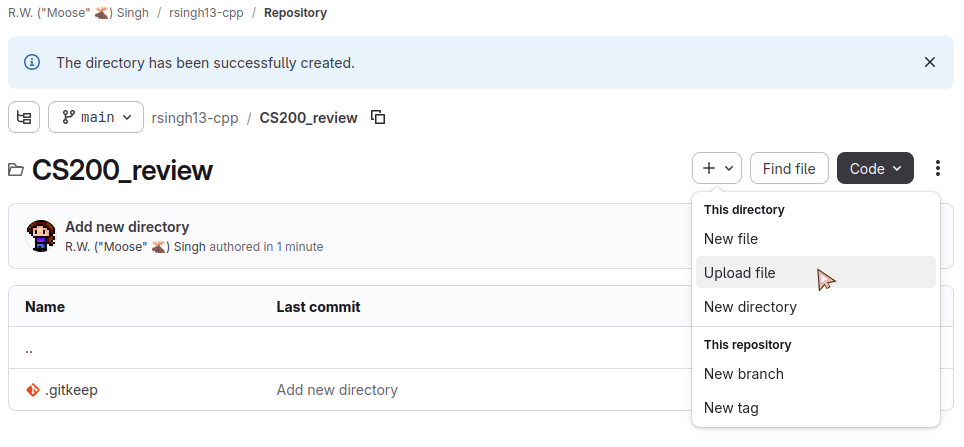 reference-gitlab/GitlabUploadFileDropdown.png
Alt Text
Screenshot of the 'CS200review' folder on the web interface, and selecting 'Upload file'.
HTML
<img src="https://rwsingh.likespizza.com/teacher-tools/atil/uploads/reference-gitlab/GitlabUploadFileDropdown.png" alt="Screenshot of the 'CS200review' folder on the web interface, and selecting 'Upload file'.">
emacs orgmode
#+CAPTION: Screenshot of the 'CS200review' folder on the web interface, and selecting 'Upload file'.
#+ATTR_HTML: :alt Screenshot of the 'CS200review' folder on the web interface, and selecting 'Upload file'.
[[https://rwsingh.likespizza.com/teacher-tools/atil/uploads/reference-gitlab/GitlabUploadFileDropdown.png]]
Markdown

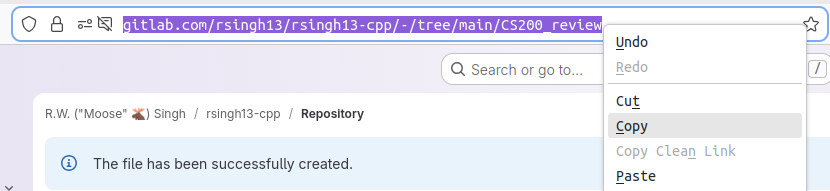 reference-gitlab/GitlabUrlCopy.png
Alt Text
Screenshot of the address bar in the web browser highlighted with the 'Copy' option highlighted.
HTML
<img src="https://rwsingh.likespizza.com/teacher-tools/atil/uploads/reference-gitlab/GitlabUrlCopy.png" alt="Screenshot of the address bar in the web browser highlighted with the 'Copy' option highlighted.">
emacs orgmode
#+CAPTION: Screenshot of the address bar in the web browser highlighted with the 'Copy' option highlighted.
#+ATTR_HTML: :alt Screenshot of the address bar in the web browser highlighted with the 'Copy' option highlighted.
[[https://rwsingh.likespizza.com/teacher-tools/atil/uploads/reference-gitlab/GitlabUrlCopy.png]]
Markdown

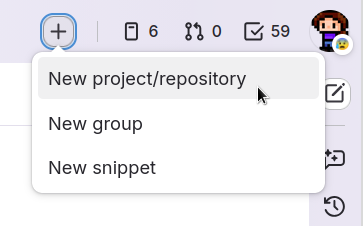 reference-gitlab/image2.png
Alt Text
Screenshot of selecting 'New project/repository' from the plus menu.
HTML
<img src="https://rwsingh.likespizza.com/teacher-tools/atil/uploads/reference-gitlab/image2.png" alt="Screenshot of selecting 'New project/repository' from the plus menu.">
emacs orgmode
#+CAPTION: Screenshot of selecting 'New project/repository' from the plus menu.
#+ATTR_HTML: :alt Screenshot of selecting 'New project/repository' from the plus menu.
[[https://rwsingh.likespizza.com/teacher-tools/atil/uploads/reference-gitlab/image2.png]]
Markdown

reference-vscode
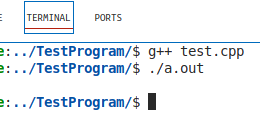 reference-vscode/vscodiumBuildRun.png
Alt Text
Screenshot of the VS Code terminal, a successful build and run.
HTML
<img src="https://rwsingh.likespizza.com/teacher-tools/atil/uploads/reference-vscode/vscodiumBuildRun.png" alt="Screenshot of the VS Code terminal, a successful build and run.">
emacs orgmode
#+CAPTION: Screenshot of the VS Code terminal, a successful build and run.
#+ATTR_HTML: :alt Screenshot of the VS Code terminal, a successful build and run.
[[https://rwsingh.likespizza.com/teacher-tools/atil/uploads/reference-vscode/vscodiumBuildRun.png]]
Markdown

 reference-vscode/vscodiumNewFile.png
Alt Text
Screenshot of the 'new file' button in the Explorer in VS Code.
HTML
<img src="https://rwsingh.likespizza.com/teacher-tools/atil/uploads/reference-vscode/vscodiumNewFile.png" alt="Screenshot of the 'new file' button in the Explorer in VS Code.">
emacs orgmode
#+CAPTION: Screenshot of the 'new file' button in the Explorer in VS Code.
#+ATTR_HTML: :alt Screenshot of the 'new file' button in the Explorer in VS Code.
[[https://rwsingh.likespizza.com/teacher-tools/atil/uploads/reference-vscode/vscodiumNewFile.png]]
Markdown

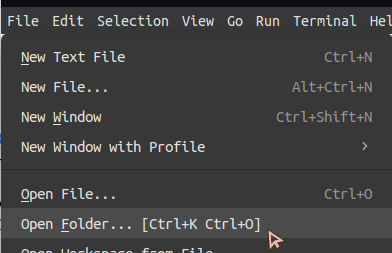 reference-vscode/vscodiumOpenFolder.png
Alt Text
Screenshot of the File dropdown menu with the Open Folder option being selected.
HTML
<img src="https://rwsingh.likespizza.com/teacher-tools/atil/uploads/reference-vscode/vscodiumOpenFolder.png" alt="Screenshot of the File dropdown menu with the Open Folder option being selected.">
emacs orgmode
#+CAPTION: Screenshot of the File dropdown menu with the Open Folder option being selected.
#+ATTR_HTML: :alt Screenshot of the File dropdown menu with the Open Folder option being selected.
[[https://rwsingh.likespizza.com/teacher-tools/atil/uploads/reference-vscode/vscodiumOpenFolder.png]]
Markdown

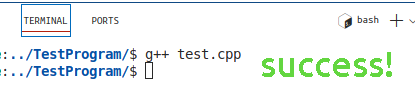 reference-vscode/vscodiumTerminalBuildSuccess.png
Alt Text
Screenshot of the VS Code terminal and the g++ command executed and returned control back to the user.
HTML
<img src="https://rwsingh.likespizza.com/teacher-tools/atil/uploads/reference-vscode/vscodiumTerminalBuildSuccess.png" alt="Screenshot of the VS Code terminal and the g++ command executed and returned control back to the user.">
emacs orgmode
#+CAPTION: Screenshot of the VS Code terminal and the g++ command executed and returned control back to the user.
#+ATTR_HTML: :alt Screenshot of the VS Code terminal and the g++ command executed and returned control back to the user.
[[https://rwsingh.likespizza.com/teacher-tools/atil/uploads/reference-vscode/vscodiumTerminalBuildSuccess.png]]
Markdown

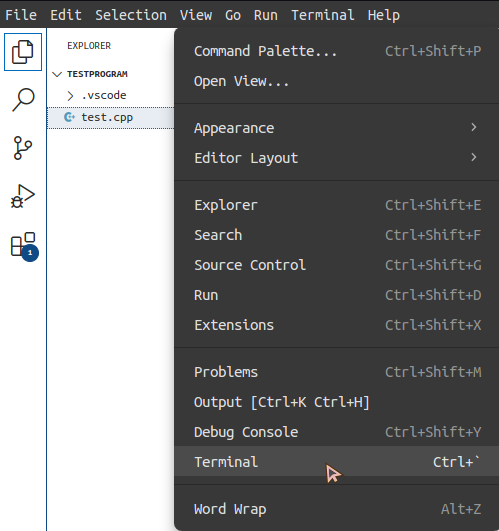 reference-vscode/vscodiumViewTerminal.png
Alt Text
Screenshot of the View dropdown menu and the View Terminal option selected.
HTML
<img src="https://rwsingh.likespizza.com/teacher-tools/atil/uploads/reference-vscode/vscodiumViewTerminal.png" alt="Screenshot of the View dropdown menu and the View Terminal option selected.">
emacs orgmode
#+CAPTION: Screenshot of the View dropdown menu and the View Terminal option selected.
#+ATTR_HTML: :alt Screenshot of the View dropdown menu and the View Terminal option selected.
[[https://rwsingh.likespizza.com/teacher-tools/atil/uploads/reference-vscode/vscodiumViewTerminal.png]]
Markdown

reference-windows
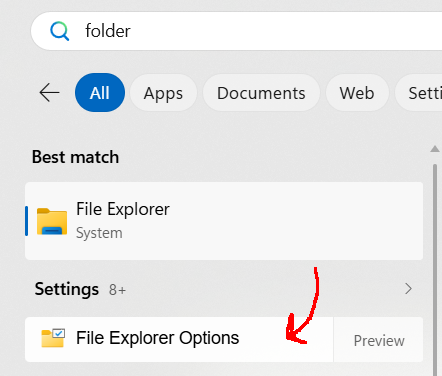 reference-windows/FileExplorerOptions.png
Alt Text
Screenshot of the Windows start menu showing the File Explorer Options.
HTML
<img src="https://rwsingh.likespizza.com/teacher-tools/atil/uploads/reference-windows/FileExplorerOptions.png" alt="Screenshot of the Windows start menu showing the File Explorer Options.">
emacs orgmode
#+CAPTION: Screenshot of the Windows start menu showing the File Explorer Options.
#+ATTR_HTML: :alt Screenshot of the Windows start menu showing the File Explorer Options.
[[https://rwsingh.likespizza.com/teacher-tools/atil/uploads/reference-windows/FileExplorerOptions.png]]
Markdown

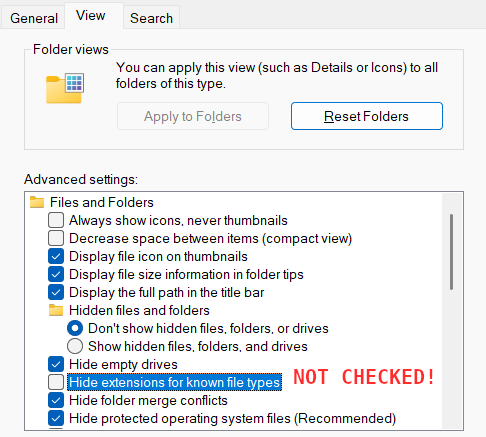 reference-windows/WindowsFolderView.png
Alt Text
Screenshot of the File Explorer Options, the Hide extensions for known file types button is NOT CHECKED.
HTML
<img src="https://rwsingh.likespizza.com/teacher-tools/atil/uploads/reference-windows/WindowsFolderView.png" alt="Screenshot of the File Explorer Options, the Hide extensions for known file types button is NOT CHECKED.">
emacs orgmode
#+CAPTION: Screenshot of the File Explorer Options, the Hide extensions for known file types button is NOT CHECKED.
#+ATTR_HTML: :alt Screenshot of the File Explorer Options, the Hide extensions for known file types button is NOT CHECKED.
[[https://rwsingh.likespizza.com/teacher-tools/atil/uploads/reference-windows/WindowsFolderView.png]]
Markdown

reference-zoom
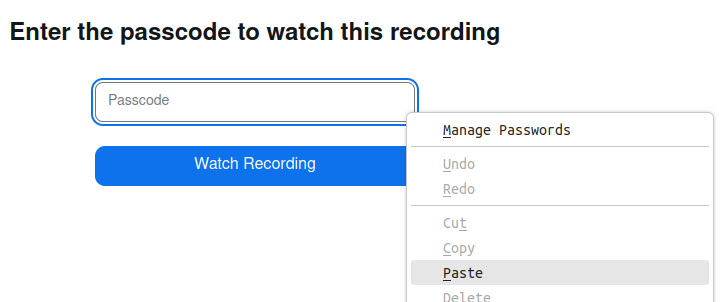 reference-zoom/ZoomCloudPastePassword.png
Alt Text
Screenshot of a right-click menu with the 'Paste' option highlighted, above the Zoom passcode textbox.
HTML
<img src="https://rwsingh.likespizza.com/teacher-tools/atil/uploads/reference-zoom/ZoomCloudPastePassword.png" alt="Screenshot of a right-click menu with the 'Paste' option highlighted, above the Zoom passcode textbox.">
emacs orgmode
#+CAPTION: Screenshot of a right-click menu with the 'Paste' option highlighted, above the Zoom passcode textbox.
#+ATTR_HTML: :alt Screenshot of a right-click menu with the 'Paste' option highlighted, above the Zoom passcode textbox.
[[https://rwsingh.likespizza.com/teacher-tools/atil/uploads/reference-zoom/ZoomCloudPastePassword.png]]
Markdown

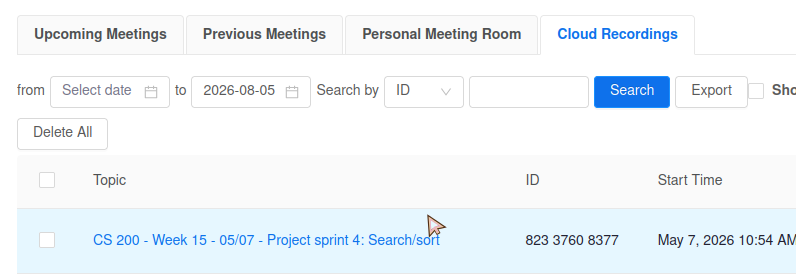 reference-zoom/ZoomCloudRecordingsList.png
Alt Text
Screenshot of the Cloud Recordings tab in the Zoom view on Canvas.
HTML
<img src="https://rwsingh.likespizza.com/teacher-tools/atil/uploads/reference-zoom/ZoomCloudRecordingsList.png" alt="Screenshot of the Cloud Recordings tab in the Zoom view on Canvas.">
emacs orgmode
#+CAPTION: Screenshot of the Cloud Recordings tab in the Zoom view on Canvas.
#+ATTR_HTML: :alt Screenshot of the Cloud Recordings tab in the Zoom view on Canvas.
[[https://rwsingh.likespizza.com/teacher-tools/atil/uploads/reference-zoom/ZoomCloudRecordingsList.png]]
Markdown

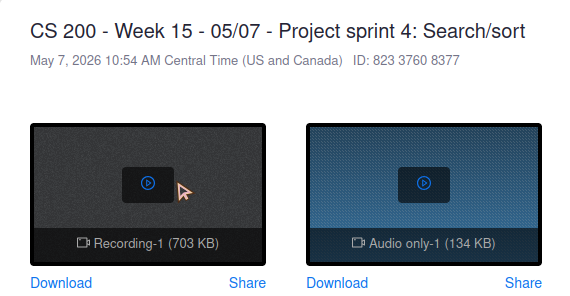 reference-zoom/ZoomCloudViewVideo.png
Alt Text
Screenshot of the video thumbnail for a cloud recording on the Zoom Canvas page.
HTML
<img src="https://rwsingh.likespizza.com/teacher-tools/atil/uploads/reference-zoom/ZoomCloudViewVideo.png" alt="Screenshot of the video thumbnail for a cloud recording on the Zoom Canvas page.">
emacs orgmode
#+CAPTION: Screenshot of the video thumbnail for a cloud recording on the Zoom Canvas page.
#+ATTR_HTML: :alt Screenshot of the video thumbnail for a cloud recording on the Zoom Canvas page.
[[https://rwsingh.likespizza.com/teacher-tools/atil/uploads/reference-zoom/ZoomCloudViewVideo.png]]
Markdown

 reference-zoom/ZoomStartClass.png
Alt Text
Screenshot of the 'Start' button next to a posted class meeting in the Zoom Canvas interface.
HTML
<img src="https://rwsingh.likespizza.com/teacher-tools/atil/uploads/reference-zoom/ZoomStartClass.png" alt="Screenshot of the 'Start' button next to a posted class meeting in the Zoom Canvas interface.">
emacs orgmode
#+CAPTION: Screenshot of the 'Start' button next to a posted class meeting in the Zoom Canvas interface.
#+ATTR_HTML: :alt Screenshot of the 'Start' button next to a posted class meeting in the Zoom Canvas interface.
[[https://rwsingh.likespizza.com/teacher-tools/atil/uploads/reference-zoom/ZoomStartClass.png]]
Markdown

setup
 setup/GitInstallTextEditor.png
Alt Text
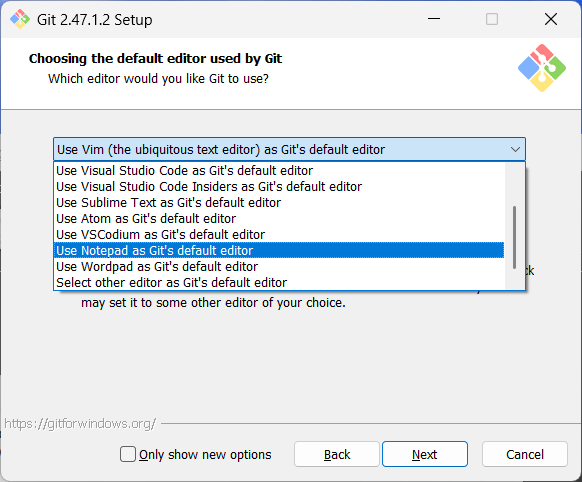
Screenshot of Git installer, 'Choosing the default editor used by Git' screen. The 'Use Notepad as Git's default editor' is selected.
HTML
<img src="https://rwsingh.likespizza.com/teacher-tools/atil/uploads/setup/GitInstallTextEditor.png" alt="Screenshot of Git installer, 'Choosing the default editor used by Git' screen. The 'Use Notepad as Git's default editor' is selected.">
emacs orgmode
#+CAPTION: Screenshot of Git installer, 'Choosing the default editor used by Git' screen. The 'Use Notepad as Git's default editor' is selected.
#+ATTR_HTML: :alt Screenshot of Git installer, 'Choosing the default editor used by Git' screen. The 'Use Notepad as Git's default editor' is selected.
[[https://rwsingh.likespizza.com/teacher-tools/atil/uploads/setup/GitInstallTextEditor.png]]
Markdown

 setup/RunProgram.png
Alt Text
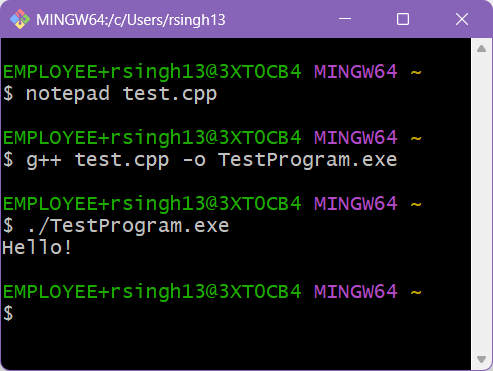
Screenshot of a program being built and run in the terminal.
HTML
<img src="https://rwsingh.likespizza.com/teacher-tools/atil/uploads/setup/RunProgram.png" alt="Screenshot of a program being built and run in the terminal.">
emacs orgmode
#+CAPTION: Screenshot of a program being built and run in the terminal.
#+ATTR_HTML: :alt Screenshot of a program being built and run in the terminal.
[[https://rwsingh.likespizza.com/teacher-tools/atil/uploads/setup/RunProgram.png]]
Markdown

 setup/WinAddEnvVar.png
Alt Text
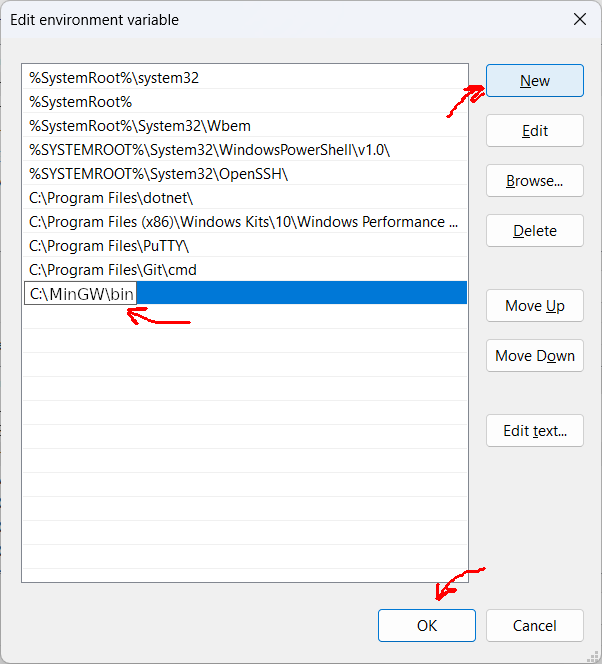
Screenshot of the Edit environment variable window, with the New button highlighted, the MinGW path pasted in, and the OK button highlighted.
HTML
<img src="https://rwsingh.likespizza.com/teacher-tools/atil/uploads/setup/WinAddEnvVar.png" alt="Screenshot of the Edit environment variable window, with the New button highlighted, the MinGW path pasted in, and the OK button highlighted.">
emacs orgmode
#+CAPTION: Screenshot of the Edit environment variable window, with the New button highlighted, the MinGW path pasted in, and the OK button highlighted.
#+ATTR_HTML: :alt Screenshot of the Edit environment variable window, with the New button highlighted, the MinGW path pasted in, and the OK button highlighted.
[[https://rwsingh.likespizza.com/teacher-tools/atil/uploads/setup/WinAddEnvVar.png]]
Markdown

 setup/WinCopy.png
Alt Text
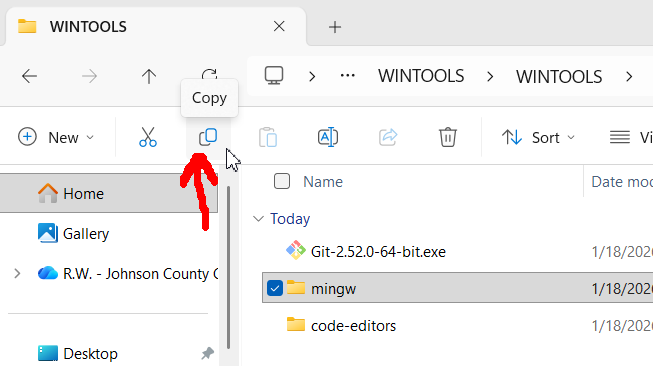
Screenshot of Windows File Explorer, the Copy icon being highlighted.
HTML
<img src="https://rwsingh.likespizza.com/teacher-tools/atil/uploads/setup/WinCopy.png" alt="Screenshot of Windows File Explorer, the Copy icon being highlighted.">
emacs orgmode
#+CAPTION: Screenshot of Windows File Explorer, the Copy icon being highlighted.
#+ATTR_HTML: :alt Screenshot of Windows File Explorer, the Copy icon being highlighted.
[[https://rwsingh.likespizza.com/teacher-tools/atil/uploads/setup/WinCopy.png]]
Markdown

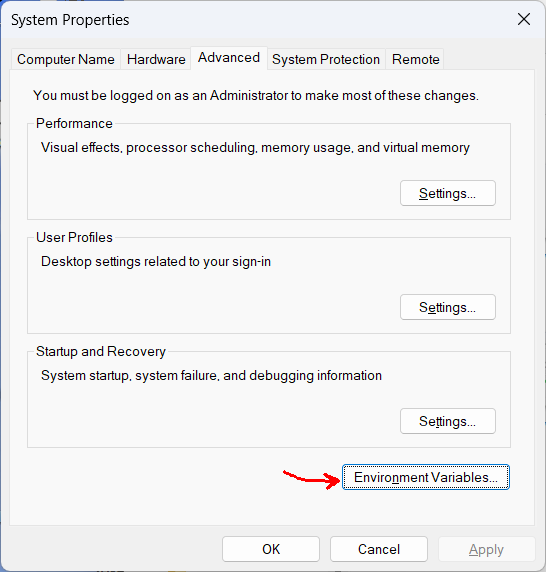 setup/WinEnvVar.png
Alt Text
Screenshot of Windows System Properties window with the 'Environment Variables' button highlighted.
HTML
<img src="https://rwsingh.likespizza.com/teacher-tools/atil/uploads/setup/WinEnvVar.png" alt="Screenshot of Windows System Properties window with the 'Environment Variables' button highlighted.">
emacs orgmode
#+CAPTION: Screenshot of Windows System Properties window with the 'Environment Variables' button highlighted.
#+ATTR_HTML: :alt Screenshot of Windows System Properties window with the 'Environment Variables' button highlighted.
[[https://rwsingh.likespizza.com/teacher-tools/atil/uploads/setup/WinEnvVar.png]]
Markdown

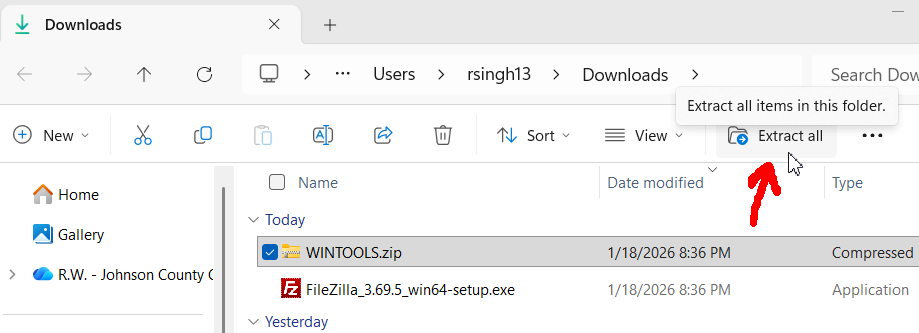 setup/WinExtractAll.png
Alt Text
Screenshot of Windows File Explorer, the Paste button being highlighted.
HTML
<img src="https://rwsingh.likespizza.com/teacher-tools/atil/uploads/setup/WinExtractAll.png" alt="Screenshot of Windows File Explorer, the Paste button being highlighted.">
emacs orgmode
#+CAPTION: Screenshot of Windows File Explorer, the Paste button being highlighted.
#+ATTR_HTML: :alt Screenshot of Windows File Explorer, the Paste button being highlighted.
[[https://rwsingh.likespizza.com/teacher-tools/atil/uploads/setup/WinExtractAll.png]]
Markdown

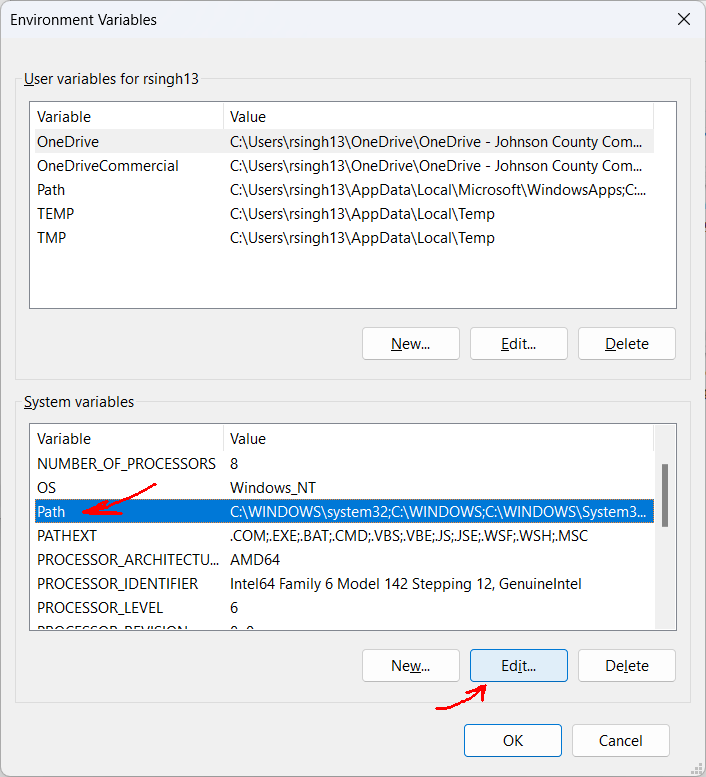 setup/WinPathEdit.png
Alt Text
Screenshot of Environment Variables window, with the Path field highlighted and the Edit button selected.
HTML
<img src="https://rwsingh.likespizza.com/teacher-tools/atil/uploads/setup/WinPathEdit.png" alt="Screenshot of Environment Variables window, with the Path field highlighted and the Edit button selected.">
emacs orgmode
#+CAPTION: Screenshot of Environment Variables window, with the Path field highlighted and the Edit button selected.
#+ATTR_HTML: :alt Screenshot of Environment Variables window, with the Path field highlighted and the Edit button selected.
[[https://rwsingh.likespizza.com/teacher-tools/atil/uploads/setup/WinPathEdit.png]]
Markdown

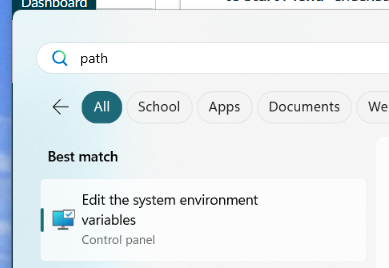 setup/WinStartEnvVar.png
Alt Text
Screenshot of the Windows Start menu with the 'Edit the system environment variables' option selected.
HTML
<img src="https://rwsingh.likespizza.com/teacher-tools/atil/uploads/setup/WinStartEnvVar.png" alt="Screenshot of the Windows Start menu with the 'Edit the system environment variables' option selected.">
emacs orgmode
#+CAPTION: Screenshot of the Windows Start menu with the 'Edit the system environment variables' option selected.
#+ATTR_HTML: :alt Screenshot of the Windows Start menu with the 'Edit the system environment variables' option selected.
[[https://rwsingh.likespizza.com/teacher-tools/atil/uploads/setup/WinStartEnvVar.png]]
Markdown

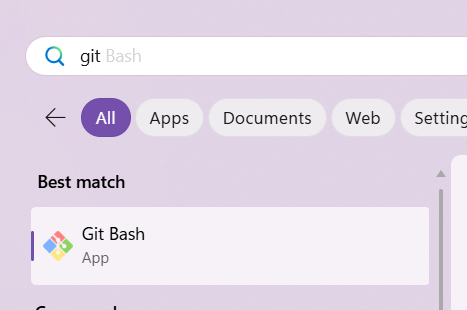 setup/WinStartGitBash.png
Alt Text
Screenshot of the Git Bash program being selected in the Windows start menu.
HTML
<img src="https://rwsingh.likespizza.com/teacher-tools/atil/uploads/setup/WinStartGitBash.png" alt="Screenshot of the Git Bash program being selected in the Windows start menu.">
emacs orgmode
#+CAPTION: Screenshot of the Git Bash program being selected in the Windows start menu.
#+ATTR_HTML: :alt Screenshot of the Git Bash program being selected in the Windows start menu.
[[https://rwsingh.likespizza.com/teacher-tools/atil/uploads/setup/WinStartGitBash.png]]
Markdown

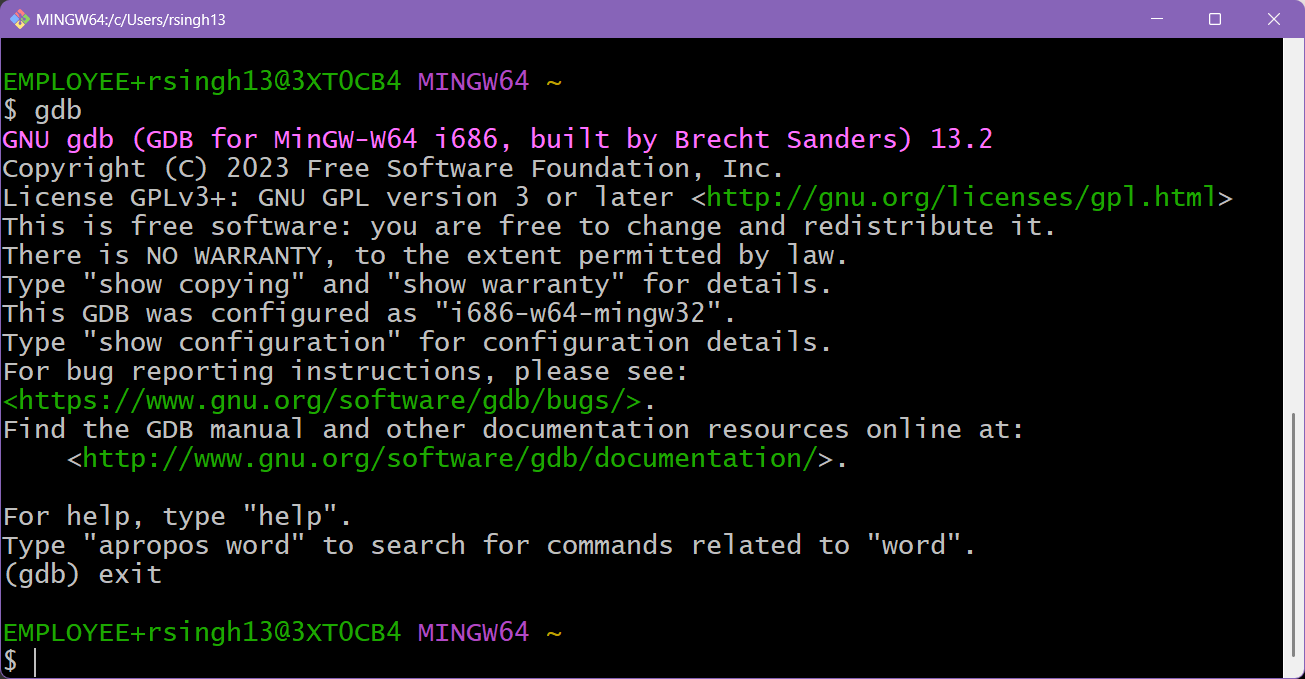 setup/gdb.png
Alt Text
Screenshot of gdb being run in the terminal.
HTML
<img src="https://rwsingh.likespizza.com/teacher-tools/atil/uploads/setup/gdb.png" alt="Screenshot of gdb being run in the terminal.">
emacs orgmode
#+CAPTION: Screenshot of gdb being run in the terminal.
#+ATTR_HTML: :alt Screenshot of gdb being run in the terminal.
[[https://rwsingh.likespizza.com/teacher-tools/atil/uploads/setup/gdb.png]]
Markdown

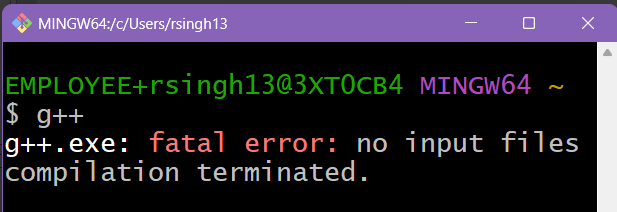 setup/gpp.png
Alt Text
Screenshot of g++ being run in the terminal.
HTML
<img src="https://rwsingh.likespizza.com/teacher-tools/atil/uploads/setup/gpp.png" alt="Screenshot of g++ being run in the terminal.">
emacs orgmode
#+CAPTION: Screenshot of g++ being run in the terminal.
#+ATTR_HTML: :alt Screenshot of g++ being run in the terminal.
[[https://rwsingh.likespizza.com/teacher-tools/atil/uploads/setup/gpp.png]]
Markdown

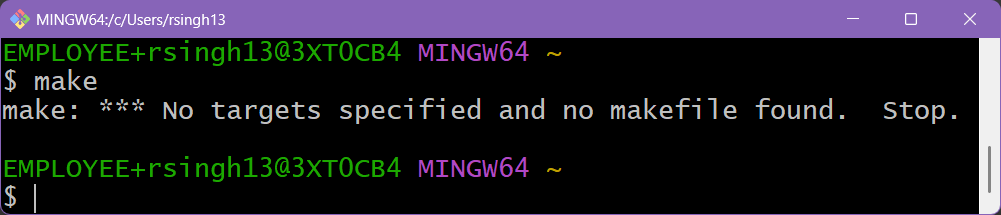 setup/make.png
Alt Text
Screenshot of make being run in the terminal.
HTML
<img src="https://rwsingh.likespizza.com/teacher-tools/atil/uploads/setup/make.png" alt="Screenshot of make being run in the terminal.">
emacs orgmode
#+CAPTION: Screenshot of make being run in the terminal.
#+ATTR_HTML: :alt Screenshot of make being run in the terminal.
[[https://rwsingh.likespizza.com/teacher-tools/atil/uploads/setup/make.png]]
Markdown
